



⚡ Did you know that most Amazon sellers are bleeding up to 40% of their PPC budget on clicks that will statistically never convert — while simultaneously losing track of inbound shipments, returned inventory, and true profitability per ASIN?
If you've ever stared at your Seller Central dashboard wondering where your shipment is, what that mysterious LPN barcode on a returned product means, or why you keep paying for ads that bring zero revenue — you're not alone. Thousands of Amazon-first brands face this exact trifecta of operational chaos every single day.
The good news? Every one of these problems is solvable — and in this guide, we'll show you the 7 proven strategies to master Amazon shipped tracking, decode LPN numbers like a pro, and restructure how you pay for ads so every dollar works harder.
Stop paying for ads that don't convert. Let AI manage your Amazon campaigns 24/7 — while you sleep.
🚀 Start Your Free Trial with AdAstraa →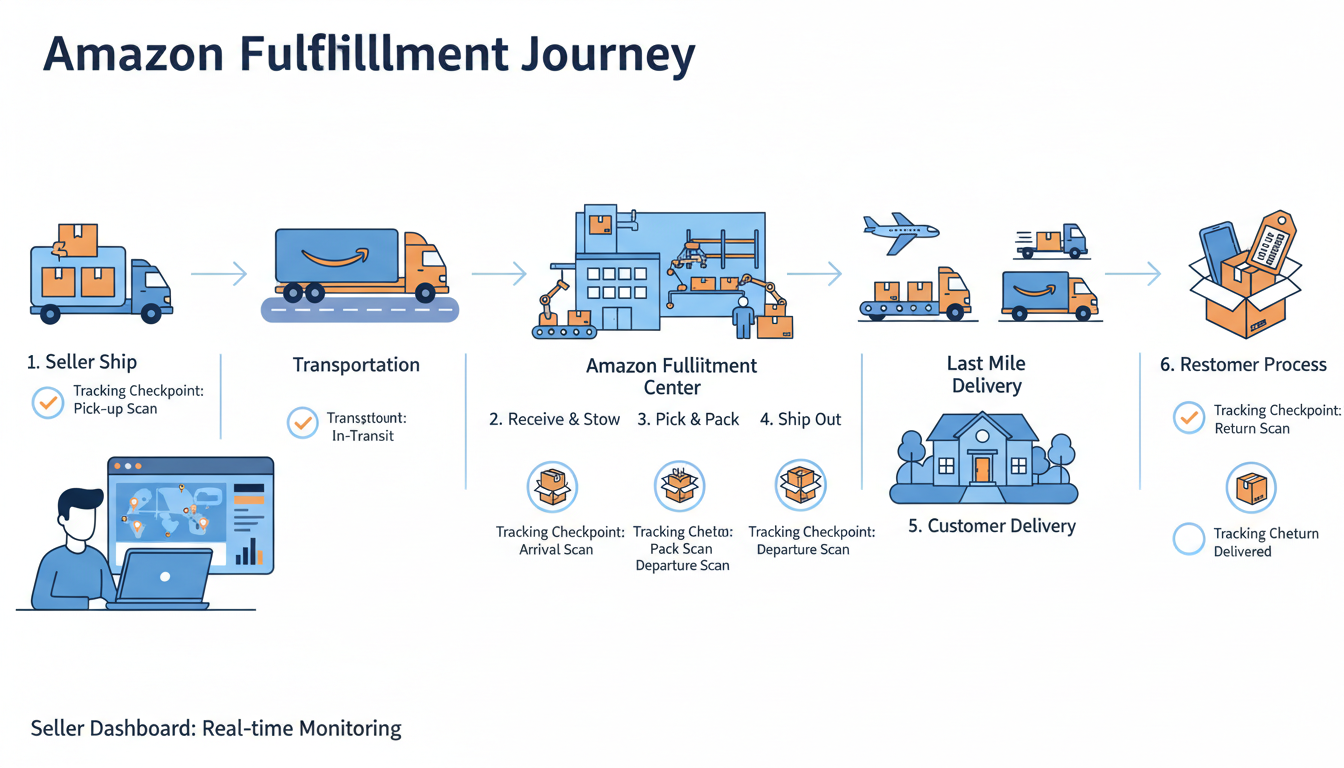
1. What Amazon Shipped Tracking Actually Means for Sellers
Most buyers think "amazon shipped tracking" is simply a link in a confirmation email. For sellers — especially FBA operators — it's the backbone of operational control. When Amazon marks an order as "shipped," a chain of essential tracking events begins across Amazon's logistics network.
Amazon Logistics handles millions of last-mile deliveries daily across the US, using a network of delivery stations, sortation centers, and independent delivery service partners. As a seller, your ability to track Amazon deliveries at the ASIN level — not just the order level — directly impacts your customer satisfaction scores, your A-to-Z claim rate, and ultimately your Amazon advertising performance.
How to Track Amazon Deliveries End-to-End
Inside Seller Central, navigate to Orders → Manage Orders and locate your shipment. Each FBA order will have an assigned carrier tracking number — either from UPS, USPS, or Amazon's own carrier (TBA — Tracking By Amazon). For Seller-Fulfilled Prime or standard merchant-fulfilled orders, you must upload tracking proactively.
- FBA Orders: Amazon manages tracking automatically post-pickup from the fulfillment center.
- MFN Orders: You're responsible for providing valid, trackable shipping to protect against A-to-Z claims.
- Multi-Channel Fulfillment (MCF): Amazon ships from your FBA inventory but on behalf of other sales channels — tracking is available via the MCF dashboard.
According to ISM research, 73% of customers consider shipping speed and tracking a significant factor in their purchasing decisions. If your tracking data is stale or absent, customer trust erodes — and so does your conversion rate.
2. The Essential Guide to Amazon LPN Numbers and LPN Barcodes
If you've ever unboxed a customer return and noticed a white sticker with a barcode starting with the letters "LPN" followed by a string of letters and numbers — that's an Amazon LPN barcode. LPN stands for License Plate Number, and it functions exactly like a fingerprint for individual inventory items inside Amazon's fulfillment network.
Think of the Amazon LPN number as Amazon's internal DNA tag for a specific, physical unit. When a customer returns a product, Amazon's warehouse associates scan the LPN to instantly understand: what this item is, what condition it arrived in, what seller it belongs to, and where it should go next — whether that's back to active inventory, liquidation, or disposal.
What the LPN Barcode on Amazon Is Actually Used For
The LPN label typically covers the product's original FNSKU or barcode on returned items — which is how you can spot it immediately. Here's what the LPN barcode Amazon system does across the fulfillment lifecycle:
| LPN Function | What It Enables |
|---|---|
| Return Identification | Links the returned unit to the original order and customer |
| Condition Grading | Helps Amazon grade the item (Sellable, Damaged, Customer Damaged, etc.) |
| Restock or Disposition | Determines if the unit goes back to active inventory or gets liquidated |
| Fraud Prevention | Detects fraudulent returns by tracing the item's history |
| Warehouse Routing | Tells fulfillment staff exactly where to route the unit within the FC |
LPN HE on Amazon — What Does It Mean?
Some sellers encounter the designation "LPN HE" on Amazon returns reports. The "HE" suffix is an internal Amazon classification used to denote a specific handling or evaluation category within a fulfillment center — it signals that the unit underwent a higher-level evaluation process before being graded. If you see LPN HE in your FBA Returns Report, it generally means the item was flagged for manual inspection beyond a standard scan-and-process return.
As a seller, the most powerful way to use LPN data is to cross-reference it against your FBA Returns Report in Seller Central. This report lists every LPN associated with returned units, the return reason, and the condition grade. Use it monthly to identify patterns — if one ASIN consistently returns with "customer damaged" or "defective" LPN records, that's a product quality or listing signal you cannot afford to ignore.
3. How to Track Amazon Deliveries Strategically — Not Just Reactively
Most sellers check tracking only after a customer complaint. That's reactive management — and it's costing you money. The breakthrough approach is building a proactive tracking system that flags delivery exceptions before customers raise them.
Here's a step-by-step operational framework for strategic Amazon shipment tracking:
- Monitor Inbound FBA Shipments Daily: Inside Seller Central under Inventory → Shipments, track the status of every inbound shipment from "Working" to "In Transit" to "Receiving." Delays at the "Receiving" stage can cause stockouts and suppress your listing's Buy Box eligibility.
- Set Up Delivery Exception Alerts: Use a third-party tool or the Selling Partner API to receive instant alerts when a tracking event shows "Delivery Attempted" or "Exception" — this is your window to act before a negative review lands.
- Audit Your FBA Returns Report Weekly: Download the report, sort by LPN number, and categorize by disposition. This tells you exactly how many units were restocked vs. lost vs. disposed — and whether Amazon owes you a reimbursement.
- Reconcile Received Quantities: Amazon regularly misses units during receiving. Cross-reference your shipped quantity vs. received quantity for every inbound shipment. File reimbursement claims promptly — the window is limited.
- Use the Inventory Ledger Report: This underused report shows every inventory event (sales, returns, removals, disposals) at the ASIN level with timestamps, giving you a complete audit trail.
4. How to Stop Paying for Ads That Drain Your Budget Every Night
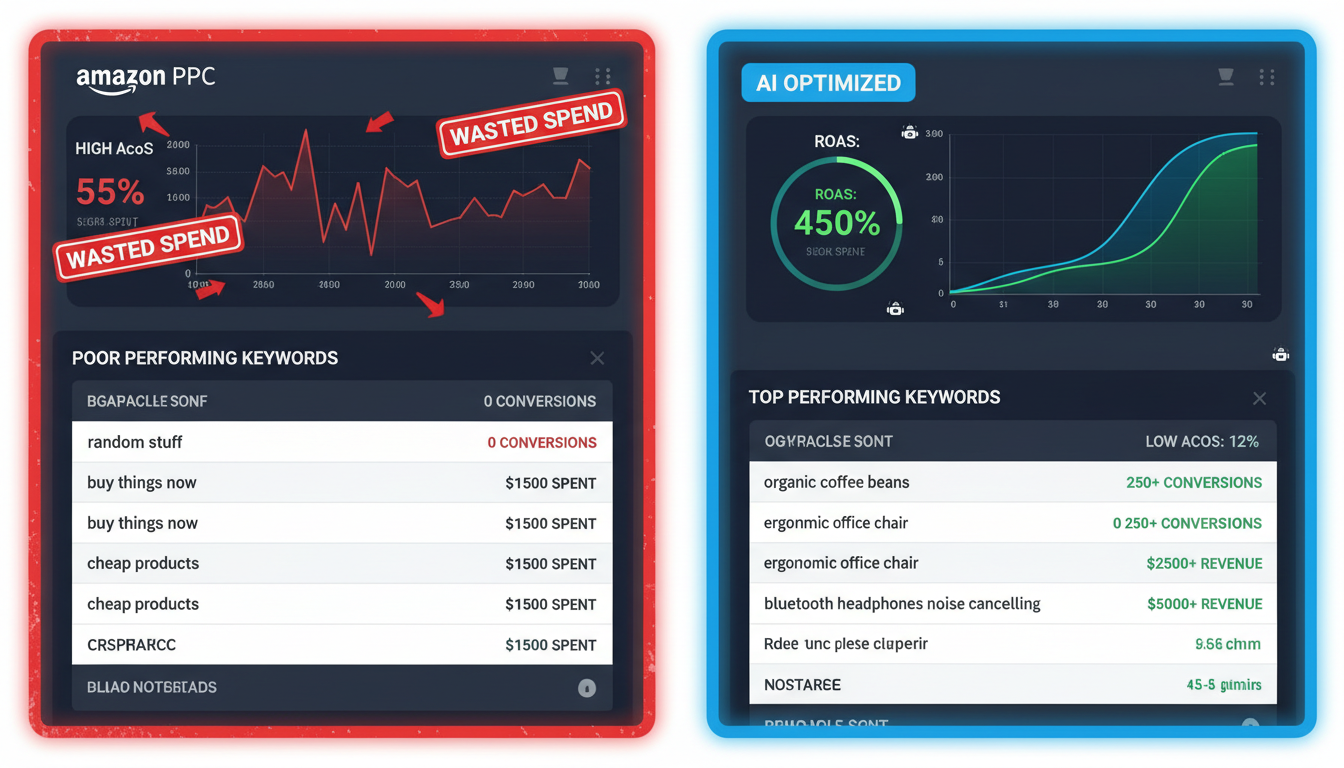
Here's an uncomfortable truth: if you're not actively managing your Amazon PPC campaigns, you are almost certainly paying for ads that are working against you right now — including while you sleep. Non-converting keywords bleed your budget in silence, bidding wars inflate your cost-per-click, and broad match campaigns trigger on irrelevant search terms that will never buy your product.
Industry data consistently shows that non-converting clicks eat 20–40% of the average Amazon PPC budget. For a brand spending $10,000/month on ads, that's up to $4,000 disappearing with zero return.
Understanding ACoS and ROAS Before You Pay for Another Ad
Before you optimize anything, you need to command two metrics:
- ACoS (Advertising Cost of Sale): Ad spend ÷ Ad revenue × 100. A 30% ACoS means you spent $30 to generate $100 in sales. Lower is generally better for mature products.
- ROAS (Return on Ad Spend): Ad revenue ÷ Ad spend. A ROAS of 4× means every $1 spent returned $4 in revenue. ROAS is the inverse of ACoS — they measure the same relationship from different angles.
Knowing your break-even ACoS — derived from your product margin — is the anchor point for every bidding decision. If your margin is 35%, your break-even ACoS is 35%. Anything above that means you're paying for ads that erode profit, not build it.
AdAstraa's Autopilot tool recalculates bids every 15 minutes and eliminates non-converting keywords automatically — so you never overpay for an ad again.
⚡ Activate Autopilot Bid Optimization →Systematically Eliminating Non-Converting Keywords
The most powerful — and most neglected — lever in Amazon PPC is the negative keyword list. Every search term that generates clicks but zero orders is a direct transfer of money from your ad budget to Amazon's revenue.
Here's the proven process to clean your campaigns:
- Pull your Search Term Report from Seller Central (covering at least 30 days of data).
- Filter for search terms with 10+ clicks and 0 orders.
- Review each term for relevance. If irrelevant or too broad, add it as a Negative Exact match.
- For terms with orders but ACoS above your break-even threshold, reduce bids by 20–30% rather than negating entirely.
- Repeat this process every two weeks. Campaigns degrade without consistent pruning.
"One of our agency clients managing 6 Amazon brands paused 45+ non-converting keywords in a single audit and recovered 38% of their monthly ad spend within 30 days — reallocating those funds to top-performing ASINs that tripled their ROAS." — AdAstraa Case Study
5. The Game-Changing Truth: Your Amazon Ads Run While You Sleep — Are They Winning?
Amazon's marketplace never sleeps. Bids shift, competitors enter and exit auctions, and shopper intent fluctuates by the hour. Meanwhile, a manually managed campaign is frozen at whatever bids and budgets you last set — maybe two weeks ago. That's a dangerous mismatch.
The essential insight here is that manual Amazon ad management has a structural ceiling. A human can check campaigns once or twice a day. An AI system like AdAstraa's AI advertising platform adjusts bids every 15 minutes, 24 hours a day, responding to real-time signals that no human can process at scale.
What 24/7 Bid Optimization Actually Delivers
Here's what changes when your campaigns run on intelligent automation versus manual management:
| Metric | Manual Management | AI Autopilot (AdAstraa) |
|---|---|---|
| Bid Adjustments | 1–2× per week | Every 15 minutes |
| Non-Converting Keywords | Caught after waste occurs | Eliminated proactively |
| Budget Utilization | Often over- or under-spent | Dynamically optimized daily |
| Hourly Performance Swings | Unaddressed until next login | Captured in real-time |
| True Profit per ASIN | Estimated or unknown | Visible in real-time dashboard |
6. How Buyer Intent Intelligence Connects Amazon Tracking Data to Ad Profit
Here's a connection most Amazon sellers completely miss: your tracking and returns data is advertising intelligence. When you know which ASINs have elevated return rates (visible through your LPN return reports), you have a direct signal that something is wrong — with the product, the listing, or the ad targeting.
If you're driving paid traffic to an ASIN that returns at a 15% rate, you're not just losing on product margins — you're actively paying for ads that create returns, eating your ACoS from both sides. This is why connecting fulfillment visibility to ad strategy is non-negotiable for profitable scaling.
Using Shopper OS to Align Ad Spend with Real Purchase Intent
AdAstraa's Shopper OS buyer intent intelligence analyzes behavioral signals across the Amazon marketplace to identify which keywords, ASINs, and customer segments are closest to conversion. This means you stop bidding broadly and start targeting buyers, not browsers.
When Shopper OS data is layered on top of your LPN return patterns and shipment velocity data, you get a complete picture: which products convert well, ship fast, return rarely, and deserve more ad investment — and which ones are silently destroying your profitability.
7. The Ultimate Metric: True Profit per ASIN — Track It, or Fly Blind
Revenue is vanity. Profit is sanity. And for Amazon sellers managing dozens of ASINs across multiple ad campaigns, True Profit per ASIN is the only metric that tells the complete, unvarnished story of your business health.
True Profit per ASIN accounts for: product cost, FBA fees, referral fees, PPC ad spend, return and disposal costs (tracked via LPN data), and storage fees. Without all of these inputs, your profitability calculation is fundamentally broken — and you're making reinvestment decisions on incomplete data.
Building a Breakthrough Profitability Dashboard
Here's what a step-by-step True Profit calculation per ASIN should include:
- Gross Revenue — Total sales from organic + paid traffic
- Less: Amazon Fees — Referral fee (typically 8–15%) + FBA fulfillment fee per unit
- Less: PPC Ad Spend — Pulled directly from your Sponsored Products/Brands/Display reports
- Less: COGS — Your per-unit product cost including inbound shipping
- Less: Returns Cost — Units restocked, disposed, or reimbursed (from your LPN returns data)
- Less: Storage Fees — Monthly and long-term storage fees from Seller Central
- = True Profit per ASIN
AdAstraa's ad operating system surfaces this calculation automatically for every ASIN in your catalog — updated in real-time as campaigns adjust, returns arrive, and fees fluctuate. This is the powerful intelligence layer that transforms a reactive seller into a proactive profit engineer.
For brands working with agencies, this same visibility is available through the AdAstraa agency partner program, enabling account managers to demonstrate clear ROI across every client's ASIN portfolio with guaranteed transparency.
Real-World Example: How One FMCG Brand Reclaimed $47K/Month in Wasted Ad Spend
A mid-sized personal care brand was generating $380,000 in monthly Amazon revenue — but their effective ACoS was running at 41% across their catalog, well above their 28% break-even threshold. They came to AdAstraa with one mandate: stop the bleed.
Within the first 72 hours, AdAstraa's Autopilot system analyzed 6 months of search term data and LPN return reports simultaneously. The findings were stark: 3 of their top 8 ASINs had return rates above 12%, were driving the majority of non-converting clicks, and were the primary cause of inflated ACoS. Paid traffic was amplifying the problem, not solving it.
The intervention was surgical: those 3 ASINs had their ad budgets paused and redirected to 5 high-converting, low-return-rate SKUs. Negative keyword lists were built from 90 days of click-no-conversion data. Bids were reset to break-even ACoS targets and handed to Autopilot for 24/7 management.
Results after 60 days: ACoS dropped from 41% to 24.6%. ROAS improved from 2.4× to 4.1×. Monthly ad spend was reduced by $47,000 — while revenue held flat and net profit increased by 19%. The brand hadn't changed a single product. They changed how they paid for ads.
Additional Resources
Deepen your expertise with these authoritative external sources on Amazon fulfillment, tracking, and advertising:
- Amazon Seller University — Inventory Management Best Practices — Official Amazon resource covering FBA inventory tools, shipment tracking, and demand forecasting strategies.
- Amazon Advertising — ACoS and ROAS Official Guide — Amazon's own guide to understanding and calculating Advertising Cost of Sale and Return on Ad Spend.
- Search Engine Land — How to Reduce Wasted Amazon Ad Spend — Actionable audit framework for eliminating inefficient PPC spend from a leading digital marketing publication.
- SellerApp — Amazon Inventory Management Tips and Strategies — Comprehensive guide to FBA inventory best practices, demand forecasting, and Seller Central tools.
- Perpetua — The Ultimate Amazon PPC Optimization Guide (2024) — In-depth breakdown of Amazon pay-per-click strategy, bidding mechanics, and performance KPI benchmarks.
The Bottom Line: Tracking, Transparency, and Smarter Ad Spend Win on Amazon
Amazon's marketplace rewards sellers who operate with complete operational visibility. That means knowing exactly where every shipment is, understanding what every LPN barcode on a returned item tells you about product quality and listing accuracy, and making every dollar you pay for ads work as hard as mathematically possible.
The 7 strategies in this guide are not theoretical. They are the same operational levers that the fastest-growing Amazon brands use daily — and the same intelligence layer that AdAstraa's AI advertising strategies automate at scale.
You now have the blueprint. The only question is whether you'll execute it manually, one campaign at a time — or deploy an AI operating system that does it effortlessly, around the clock, while you sleep.
Ready to stop wasting ad spend and start scaling with true profit visibility?
Join hundreds of Amazon-first brands already using AdAstraa to optimize bids, track True Profit per ASIN, and reclaim hours of manual management every week.
🎯 Start Your Free AdAstraa Trial Today →